

How to Build a Real-Time Snowflake Project With CDC and S3
A real-time Snowflake project with CDC and S3 is a pipeline that captures database changes, lands them in Amazon S3, and loads them into Snowflake for fast analytics. It matters because you get fresh data without reloading whole tables every hour.
CDC means change data capture, Snowflake is your cloud data warehouse, and S3 is the storage layer in the middle. If you want a practical project that looks good in a portfolio and teaches real pipeline design, this is one of the best ones to build. Read first:
Quick summary: This project moves inserts, updates, and deletes from a source database into Snowflake with near real-time freshness, using S3 as the landing zone and buffer.
Key takeaway: The hard part is not loading files. The hard part is keeping ordering, retries, and merge logic correct when data changes fast.
Quick promise: By the end, you’ll know how to design the architecture, structure S3, model Snowflake layers, and avoid the mistakes that break CDC pipelines.
Why this Snowflake project is a strong real-world use case
CDC, S3, and Snowflake are a common pattern because they keep analytics data fresh without expensive full reloads. That’s good for reporting, operations, and trust in the numbers.
What CDC solves that batch pipelines cannot
Batch pipelines copy entire tables on a schedule. That works, until tables get large or the business wants fresh updates every few minutes.
CDC fixes that by sending only what changed:
- A new order gets inserted
- A customer email gets updated
- An item goes out of stock and the quantity changes
- A canceled record gets deleted
Think of it like moving mail instead of moving the whole house. You only carry the pieces that changed. That cuts load time, reduces cost, and gives teams fresher dashboards.
Why S3 is a useful landing zone before Snowflake
S3 is cheap, durable storage for raw change files. It gives you a safe stop between the source database and Snowflake.
That buffer matters for a few reasons:
- If Snowflake is behind, you don’t lose changes
- If a load fails, you can replay files
- If you need an audit trail, raw events are still there
Without that middle layer, your pipeline gets more fragile. With it, your systems are decoupled, and recovery gets much easier.
Set up the project architecture from source to Snowflake
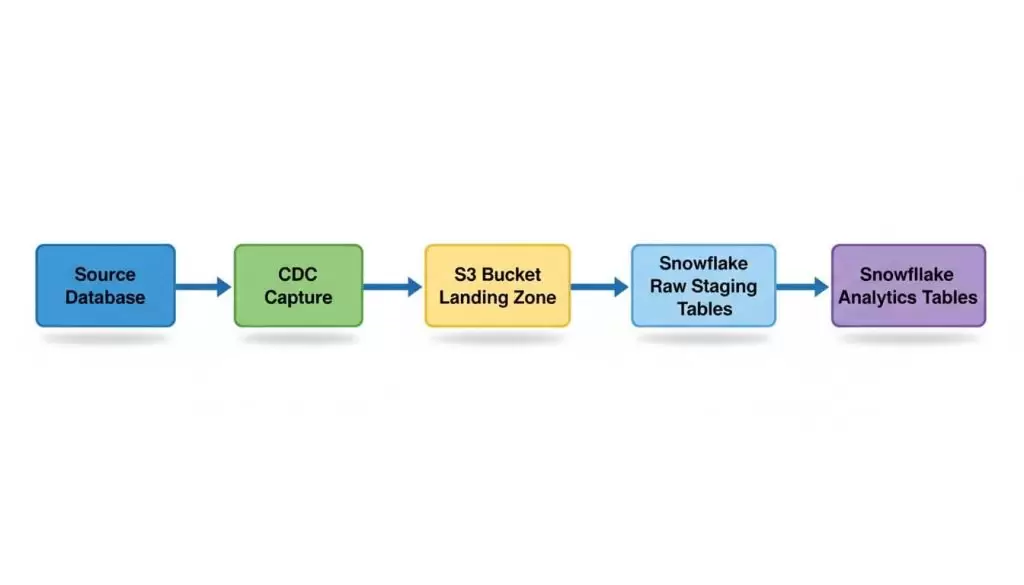
Choose your source system and CDC method
Pick a transactional database with frequent changes, like MySQL or PostgreSQL. For a demo, choose tables with clear primary keys and obvious updates, such as orders, customers, or inventory.
Your CDC method can come from:
- Database logs
- Connectors
- Managed ingestion tools
Keep it tool-agnostic at first. What matters is that you can capture inserts, updates, and deletes with ordering metadata.
Design the S3 folder structure for clean ingestion
Good S3 structure saves you pain later. Keep raw, processed, and archived files separate, then organize by source, table, and date.
A clean pattern looks like this in plain language:
- raw/source_name/table_name/date/
- processed/source_name/table_name/date/
- archive/source_name/table_name/date/
That makes backfills safer and loads easier to reason about.
Plan Snowflake tables for raw, staging, and final data
In Snowflake, don’t dump everything into one table and hope for the best. Split the work into layers.
- Raw tables keep the source payload close to original
- Staging tables clean, type-cast, and dedupe
- Final tables apply business rules for analytics
The raw layer is your safety net. The later layers are where you make the data usable.
Build the CDC pipeline that keeps data moving
This is the core of the project. You need to capture change events, land them in S3, and do it in a way that survives retries, delay, and duplicate delivery.
Capture inserts, updates, and deletes correctly
A real CDC pipeline has to handle all three change types. If you skip deletes, your analytics tables will drift from the source.
A solid event usually includes:
- The operation type
- The business key or primary key
- The event timestamp
- A sequence number or offset
Those fields help you order events and pick the latest version of a row. They also help with duplicate messages and late-arriving changes.
Load CDC files into S3 in a predictable format
Snowflake can read JSON, CSV, or Parquet, but consistency matters more than the format itself. Pick one format and stick to a clear naming pattern.
Also pay attention to file size. Too many tiny files can slow loading and create operational noise. Add metadata like source timestamp and load timestamp so debugging is easier when something looks off.
Handle retries, failures, and duplicate records safely
Pipelines fail. Files arrive twice. Jobs restart. That’s normal.
What matters is idempotency, meaning the pipeline can run again without corrupting results. Use offsets, checkpoints, or file-tracking logic so reprocessing the same event doesn’t create extra rows or bad updates.
If your pipeline can’t be rerun safely, it’s not production-ready yet.
Bring the data into Snowflake and turn it into usable tables
Snowflake reads files from S3 through stages, lands them in raw tables, and then applies merge logic to update final tables. That’s how raw change events become analytics-ready data.
Use Snowflake stages and file loading to ingest S3 data
Stages tell Snowflake where the files live and how to read them. Once configured, you load files into landing tables first, not straight into your final reporting tables.
That extra step helps because raw landing tables preserve the original event data. If parsing or transformation breaks, you still have the source event inside Snowflake.
Apply merge logic to keep target tables up to date
MERGE is the pattern that makes CDC useful in Snowflake. It lets you match incoming change events to existing rows and then insert, update, or delete as needed.
A good merge strategy depends on:
- A stable business key
- Deduping repeated events
- Choosing the latest record per key
If three updates arrive for the same customer, you don’t want all three versions in the final table. You want the newest valid state.
Build checks so the data stays accurate
Data quality checks catch issues early. Keep them simple and run them often.
Useful checks include:
- Row counts between stages
- Freshness checks on event timestamps
- Duplicate key checks
- Basic source-to-target reconciliation
These checks help you spot missing files, broken parsing, and bad merge logic before someone trusts a dashboard with bad data.
Test, monitor, and improve the project after it works
A real-time project only matters if it stays healthy after launch. Testing, monitoring, and a few small optimizations will do more for reliability than fancy architecture diagrams.
Test end-to-end data flow with a small sample
Start with a few known records. Insert one, update one, and delete one in the source.
Then verify each step:
- Did the CDC event get captured?
- Did the file land in S3?
- Did Snowflake ingest it?
- Did the final table reflect the correct result?
This sounds basic, and it is. That’s why it works.
Watch for lag, failed loads, and file growth
The best signals are simple. Watch ingestion delay, failed loads, unusual file counts, and tables that stop updating.
If lag keeps growing, something is backing up. If file counts spike, you may have a small-file problem. If records land in raw but not final, your transformations need attention.
Improve cost and performance without redesigning everything
You don’t need a giant rebuild to improve this project. Small fixes go a long way.
Try these first:
- Batch events into better-sized files
- Reduce unnecessary columns in raw payloads
- Tune load frequency based on business need
- Keep only useful history in higher layers
That gets you a cleaner, cheaper pipeline without changing the whole design.
FAQ
What is CDC in a Snowflake project?
CDC is change data capture. It tracks inserts, updates, and deletes in the source database so you move only changed records into Snowflake, not full tables every time.
Why use S3 before loading data into Snowflake?
S3 gives you a durable landing zone for raw events. It acts as a buffer, helps with replay, and makes failures easier to recover from.
Can Snowflake read CDC files directly from S3?
Yes. Snowflake can ingest files from S3 through stages and loading workflows. Most teams still land files in raw tables first, then transform them later.
Which source database is best for a demo project?
MySQL and PostgreSQL are both solid choices. Pick one with tables that change often and have clear keys, like orders or customers.
How do you handle deletes in CDC pipelines?
You include delete events in the raw feed and apply that logic in Snowflake merges. If you ignore deletes, target tables stop matching the source.
What file format should I use in S3?
JSON, CSV, and Parquet can all work. Choose the format your tooling supports well, then keep naming, schema, and metadata consistent.
How do you stop duplicate CDC events from breaking the data?
Use event timestamps, sequence numbers, offsets, and dedupe rules in staging. The pipeline should be safe to rerun without changing correct results.
Is this a good project for a data engineering portfolio?
Yes. It shows pipeline design, cloud storage, warehouse loading, merge logic, and operational thinking. That’s a strong mix for interviews and portfolio reviews.
Conclusion
This project is a complete real-time data engineering workflow, not a toy example. You capture source changes, land them safely in S3, load them into Snowflake, and apply merge logic that keeps analytics tables current.
That’s why it’s such a strong portfolio project. It shows you can think end to end, handle reliability, and build something closer to what teams use at work.
Build it one layer at a time. Get the raw events right first, then the loads, then the merges, then the checks.
