

Modifying data is an important element of data analysis and frequently entails executing various operations on data frames in Python.
Subtracting columns between data frames is a frequent job that enables us to calculate differences between different sets of data and to gain fresh ideas.
Subtracting columns between data frames involves executing element-wise subtraction of related columns. You can compare data using this operation, determine differences, or create additional columns based on the subtraction result.
Python offers several modules and techniques to achieve this efficiently.
In Python, when working with data frames, you may frequently get situations where you need to perform column-wise subtraction between two data frames.
With this procedure, you may figure out how much the associated columns differ from one another and get a new data frame with the findings.
Key Takeaways
- The fastest way to subtract columns in Pandas is with the
-operator. Use it when both columns already align by row, and you want a simple element-wise result. Pandas performs arithmetic by matching labels and indexes. - Use
DataFrame.sub()when you need more control. Thesub()method is better when you want to specify an axis or handle missing values withfill_value. Pandas officially supportsother,axis,level, andfill_valuein this method. - Mismatched indexes are a common reason subtraction returns
NaN. When rows or columns do not line up, Pandas aligns labels before calculating. That is helpful, but it can create missing values if the two objects are not shaped or indexed the same way. - Subtracting columns in the same DataFrame is the most common use case. For example, you can calculate profit, variance, change, or delta with
df["A"] - df["B"]. This is usually clearer and easier to read than row-wise loops. - Subtracting between two DataFrames works best when both indexes are aligned first. If the DataFrames come from different sources, align them before subtracting so the result is predictable.
fill_value=0is useful, but only when zero is logically correct. It can prevent unwantedNaNresults, but it should not be used blindly if missing data has business meaning. Pandas supports this directly insub().- For AEO and readability, examples should move from simplest to most realistic. Start with one-column subtraction, then two DataFrames, then missing values, then multi-column subtraction.
You can use the powerful capabilities of its Pandas module, which offers effective and simple tools for data manipulation and analysis, to complete this operation.
Python Subtract Columns Between Dataframes
Organizations and people alike greatly rely on deriving actionable insights from huge quantities of data in a modern data-driven environment.
Python, with its strong libraries like Pandas, has become a well-liked option for data analysis because of its adaptability, effectiveness, and wide ecosystem.
As a fundamental data analysis operation, column subtraction enables analysts to create new variables, compute differences, and identify patterns that support well-informed decision-making.
This article provides a complete tutorial to help you understand and implement the ways for
Understanding data frames in Python
In Python, a data frame is a two-dimensional labeled data structure that is extensively used for data manipulation and analysis.
It is an important part of well-known data analysis libraries like Pandas and offers a practical method for storing, organizing, and analyzing data.
Before we get into column subtraction, let’s review data frames. A data frame is made up of rows and columns, where each column represents a specific behavior or feature, and each row corresponds to a specific record or observation.
A structured and organized method of storing and working with data is provided by data frames. They are an effective tool for jobs involving data analysis and modification since they provide a variety of features, including indexing, filtering, aggregation, and transformation.
What is Pandas Library?
Pandas is a strong Python library that offers a wide range of tools for data manipulation and analysis. It introduces a DataFrame data structure, which is formed by similar data structures present in programming languages such as R and SQL. Data Frames are made to manage both tabulated and structured data.
Pandas DataFrame is a tabular data structure with labeled axes (rows and columns) that is two-dimensional, size-mutable, and possibly heterogeneous.
Data is arranged in rows and columns of a data frame, and this is a two-dimensional structure for data. The data, rows, and columns represent all the main parts of a Pandas data frame.
- To subtract columns between data frames in Python
you can utilize the powerful Pandas library. By employing the subtraction operator (-) on the desired columns of two data frames, you can obtain a new data frame that represents the difference between the values in the corresponding columns.
This approach allows you to perform column-wise subtraction and analyze the variances or imbalances between the datasets.
How to Install Pandas Library
To install the Pandas library in Python, follow these steps:
STEP 1: Open your ‘command prompt’ or ‘terminal window’.
STEP 2: Use the pip (Python package installer) to install Pandas. Execute the following command.
| pip install pandas |
This command will download and install the latest version of Pandas from the Python Package Index
STEP 3: Hold off until the installation is finished. Pip will do the required file downloads and install pandas and all its dependencies.
STEP 4: Once the installation is complete, you can import pandas in a Python script or an interactive interface to check if it has been set up correctly.
Open a Python script or a Python interactive prompt and type the following code.
| import pandas as pd |
If there are no error messages, it means pandas have been installed correctly.
Congratulations! You have successfully installed pandas. You can use it.
Why do we use pandas as pd?
‘Import pandas as pd’ is a Python import statement that imports the Pandas library and gives it a name such as pd.
The import keyword is used in Python to bring in external modules or libraries so that you can use their features. In this scenario, the Pandas library is imported.
The given name PD is commonly utilized to refer to the Pandas library. By giving the library a different identity.
you can refer to its functions and classes using the shorter identity rather than the entire library name. It makes the code clearer and easier to read.
Syntax of pandas
| pandas.Dataframe(data) |
Pandas DataFrame Subtraction: sub() function
To subtract one data frame or Series from another in Pandas, use the sub() function. Arranging the rows and columns according to their labels subtracts elements by element.
The sub() function can be used on a DataFrame or Series object and takes another DataFrame, scalar value, Series, or array-like object as an input.
- Syntax
| pandas.DataFrame.sub(other, axis=’columns’, level=None, fill_value=None) |
- where, other Required a number, list of numbers, or another object with a data structure that is compatible with the original DataFrame.
- axis Optional, an option that selects whether to compare using a column or an index.
0 or ‘index’ means compare by index.
1 or ‘columns’ means compare by columns.
- level Optional a number or label indicating the comparison point.
- fill_value is an optional value to fill in missing values during the subtraction. NaN is used by default to fill in missing values.
Why do we use scalar values, series, and axes in Python for pandas subtracting?
Scalar values, Series, and the axis parameter serve additional functions in Pandas operations. Let’s talk about them in brief.
- Scalar Value
A single number, such as an integer or a float, is known as a scalar. In pandas, you can use a scalar value to execute arithmetic operations (e.g., addition, subtraction, multiplication, division) with Data Frame or Series.
You could, for instance, subtract a scalar value from a column.
- Series
a series of pandas represents a one-dimensional labeled array-like object. It represents a single column or row of data in a data frame.
Series are useful for several activities, including filtering, aggregation, and arithmetic calculations.
For example, you can subtract one Series from another, conduct mathematical operations on a Series, and so on.
- Axis
The axis parameter is used to define the axis along which task is performed in pandas.
- Operations along the rows are indicated by axis=0.
- Operations along the columns are indicated by axis=1.
Axis specification is made possible via the axis parameter in several pandas functions, including sum(), mean(), drop(), etc.
Let’s see a few examples of using the Pandas sub-function.
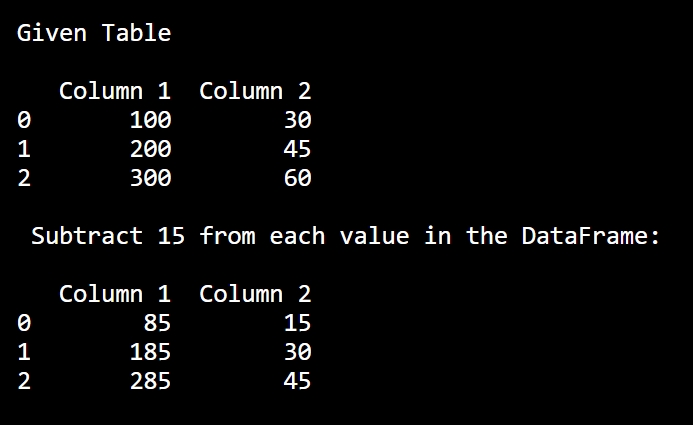
Example 1: In this Pandas sub-data frame example, we will subtract some values from the entire data frame.
- Code
| import pandas as pd data = { “Column 1”: [100, 200, 300], “Column 2”: [30, 45, 60] } df = pd.DataFrame(data) print(“Given Table \n “) print(df) print(“\n Subtract 15 from each value in the DataFrame: \n”) print(df.sub(15)) |
- Output
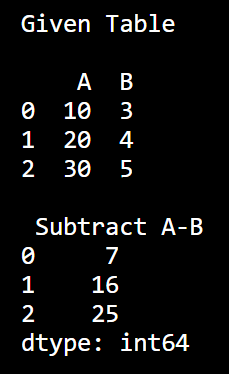
Example 2: Subtract one column value to another column value?
- Code
| import pandas as pd data = { “A”: [10, 20, 30], “B”: [3, 4, 5] } df = pd.DataFrame(data) print(“Given Table \n “) print(df) print(“\n Subtract A-B”) print(df[‘A’] – df[‘B’]) |
- Output
Example 3: In this example, an array is given to the subtract function of pandas. The axis option is used to specify the axis on which the operation is done. We can observe in the output that the values in the data frame are decreasing.
- Code
| import pandas as pd data = { “X”: [35, 45, 55], “Y”: [40, 50, 60] } df = pd.DataFrame(data) print(df.sub([5, 10], axis=’columns’)) |
- Output
Example 4: Using series data along with Pandas subtraction function?
- Code
| import pandas as pd data = { “X”: [30, 40, 50], “Y”: [40, 50, 60] } df = pd.DataFrame(data) print(df.sub(pd.Series([10, 15, 20]), axis=’index’)) |
- Output
In this way we can use Python Subtract Columns Between Dataframes.
Why do we use the Pandas library?
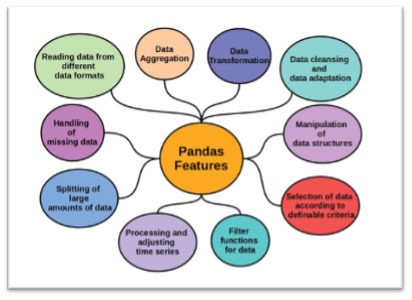
Python’s Pandas package is frequently used for data analysis and manipulation activities. Here are some reasons for using the Pandas library.
- Data Representation
Pandas include the Data Frame data structure, which is a powerful and flexible tool for storing and manipulating structured data.
It allows you to easily work with tabular data, manage missing values, and conduct actions on rows and columns.
- Data Cleaning and Transformation
Pandas provide a large range of functions and methods for cleaning and transforming data.
It offers capabilities for dealing with missing data, getting rid of duplicates, changing data kinds, and reshaping data, which makes pre-processing and getting ready data for analysis simpler.
- Data Exploration and Analysis
By offering simple tools for compiling, aggregating, and visualizing data, Pandas makes it possible to perform exploratory data analysis.
You can use it to do calculations, generate descriptive statistics, and produce graphs and charts to understand the data.
- Data Integration
Pandas help data integration by providing methods for merging, joining, and concatenating datasets.
It helps you to handle complex data relationships, conduct database-style joins, and aggregate data from several sources.
- Time Series Analysis
Working with time series data is well supported by Pandas.
It offers specialized data structures and functions for managing time-based data, carrying out resampling, time shifting, and frequency conversion operations.
- High Performance
Pandas is built on top of NumPy, which is a highly efficient numerical computing library.
Because it makes use of NumPy arrays’ speed advantages, it is appropriate for handling huge datasets and carrying out vectorized computations.
- Interoperability
Pandas easily work with other Python ibraries and data research tools.
It combines the functionality of libraries like NumPy, Matplotlib, SciPy, and sci-kit-learn with ease, enabling you to perform advanced data analysis jobs.
Best Practices for Subtracting Columns
When subtracting columns between data frames in Python, it’s important to follow some best practices to ensure accuracy, efficiency, and compatibility. Here are a few key considerations.
1) Check for Compatibility
Before performing column subtraction check if the data frames have compatible columns. Ensure that the column names match and the data types are suitable for subtraction operations. Handle any inconsistencies or mismatches appropriately.
2) Handle Missing Values Appropriately
Missing values can affect the accuracy of column subtraction. Consider filling or imputing missing values before performing the subtraction operation.
Choose a suitable approach, such as replacing with zeros or imputing with mean or median values based on the context of the data.
3) Validate Data Types
Different data types can impact the subtraction operation. Validate the data types of the columns and convert them.
if necessary to ensure compatibility. Use functions like type () or numeric() to convert columns to the desired data types.
4) Consider Performance Optimization
When dealing with large data frames, performance optimization becomes crucial. To improve efficiency, consider using vectorized operations, such as those provided by Pandas, instead of iterating over each element.
Vectorized operations are optimized for speed and can significantly improve the performance of column subtraction.
Features of Python Subtract Columns Between Dataframes
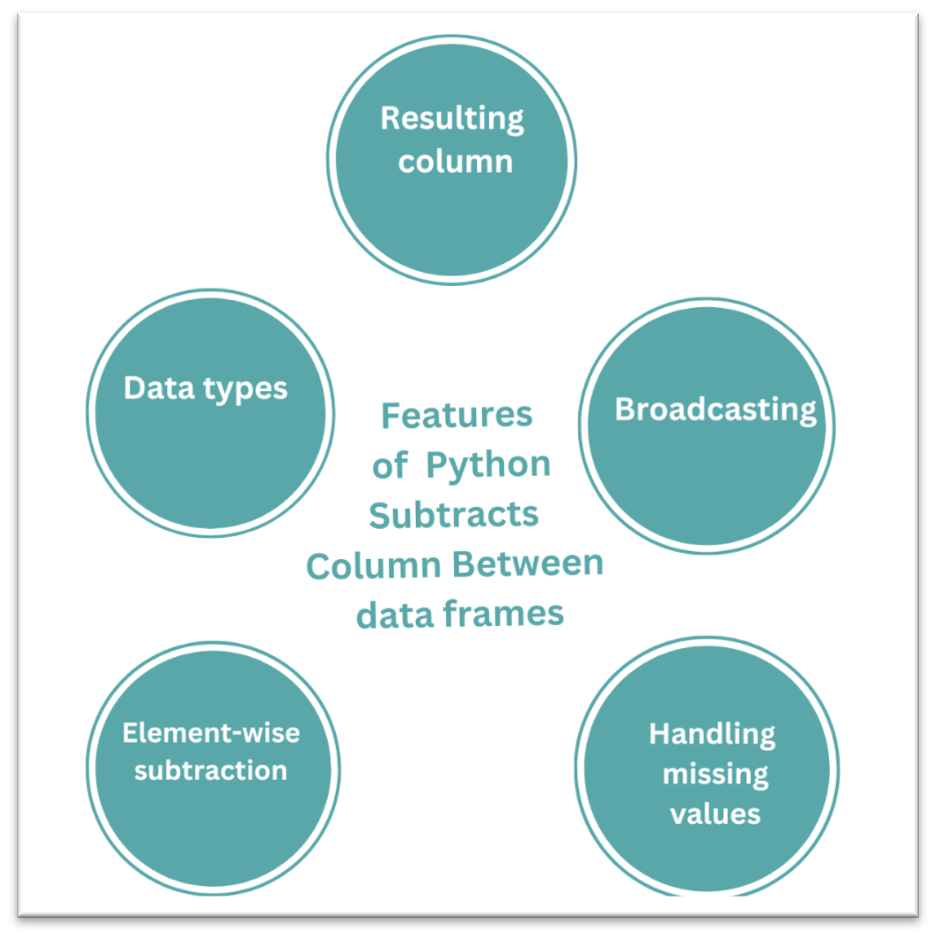
Listed below are a few succinct characteristics of column subtraction in data frames.
- Element-wise subtraction
Subtraction is performed element-by-element on the matching values in the columns.
- Handling missing values
Libraries frequently handle values that are absent during subtraction by using the NaN symbol at the appropriate spots.
- Broadcasting
By employing broadcasting principles to apply the operation across compatible dimensions, it is possible to remove columns with various shapes.
- Resulting column
A new column within the data frame is often used to hold the computed differences.
- Data types
The result depends on the information type of the columns; make sure they are compatible for exact subtraction.
FAQs on Python Subtract Columns Between Dataframes
What does subtracting columns between DataFrames mean in Python?
Subtracting columns between DataFrames means calculating the difference between corresponding values in two columns. Pandas performs this operation element by element while aligning rows based on their index labels. The result is typically a new column or Series that represents the difference between the two datasets.
Why do I sometimes get NaN values when subtracting DataFrames?
NaN values appear when the rows or columns being compared do not perfectly align. Pandas always matches values by labels before performing arithmetic. If a value exists in one DataFrame but not the other, the result is marked as missing instead of producing an incorrect calculation.
What is the difference between the subtraction operator and the sub() method?
The subtraction operator is best for simple calculations between aligned columns. The sub() method is more flexible and allows you to specify how subtraction should be applied, which axis should be used, and how missing values should be handled.
Can you subtract entire DataFrames instead of individual columns?
Yes. Pandas supports arithmetic operations between entire DataFrames. When this happens, Pandas compares each column and row by label and performs subtraction across all matching positions.
When should you use the sub() function instead of the subtraction operator?
The sub() method is useful when working with incomplete datasets, mismatched indexes, or when you want to specify how missing values should be treated. It also provides clearer method chaining in larger data pipelines.
Why is column subtraction common in data engineering?
Subtracting columns is frequently used to calculate differences between metrics, measure changes over time, validate data across systems, and build derived features used in analytics or machine learning workflows.
Does Pandas automatically match columns when subtracting DataFrames?
Yes. Pandas aligns both columns and rows based on labels before performing arithmetic operations. This alignment ensures that values from matching positions are compared correctly.
One-Minute Summary
- Subtracting columns in Pandas calculates the difference between corresponding values in two columns.
- Pandas aligns rows by index labels before performing arithmetic operations.
- Missing or mismatched values often produce
NaNresults. - The subtraction operator is the simplest method for aligned columns.
- The
DataFrame.sub()method provides additional control for handling missing values and alignment.
Final Thoughts
Using the techniques mentioned in this article, you may perform column subtraction between data frames and acquire significant insights from your data.