How to import data from a DBF file to SQL?
Data import is essential for transferring data between formats, allowing for easy integration and analysis.
When transferring previous systems, combining data from various sources, and performing data analysis, it may be required to import data from a DBF file to SQL databases.
Applications like FoxPro, Clipper, and dBase frequently use the DBF file format to store structured data. However, SQL databases are frequently employed for the management and querying of structured data.
How to import data from a DBF file to SQL
Data of all kinds, including text, numbers, dates, and logical (Boolean) values, can be stored in DBF files. They offer a quick and easy way to share or store data.
Although DBF files were frequently used in the past, as more contemporary and sophisticated database management systems have arisen, their use has diminished recently.
However, there are still tools and libraries available that can read and handle DBF files for compatibility with past systems or data translation.
Key Takeaways
- Importing data from a DBF file to SQL usually starts by converting the DBF file into CSV, then loading that CSV into a SQL table that matches the original schema.
- The exact import method depends on your database, MySQL commonly uses
LOAD DATA INFILE, PostgreSQL usesCOPY, and SQL Server often uses Bulk Insert, SSIS, or the Import and Export Wizard. - The most common import problems are mismatched data types, incorrect field mapping, and missing drivers or dependencies.
- SQL databases are often a better target format than DBF because they support stronger querying, indexing, transactions, and integration with modern tools.
- After import, validate the data by checking row counts, field mappings, and sample records to confirm the transfer worked correctly.
What is the DBF file?
A DBF (dBase) file is a database file format that was frequently used in the past to store structured data. It is a binary file format and stands for “Database File”.

The dBase database management system made DBF files widely used, and they have since become the standard format for many database applications.
A list of records follows the header section in DBF files. The header section contains data describing the database’s structure, including field names, field types, field lengths, and other metadata. Each record represents a row of data, and the fields within a record represent the columns of the table.
How To Import Data From A DBF File to SQL Step-by-Step Process
To import a DBF (dBase) file into an SQL database, you will need to follow these steps.
1. Convert the DBF file to an acceptable format.
You can use a tool like DBF Converter to convert the DBF file to CSV (comma-separated values) format. Alternatively, you can use programming languages such as Python to convert the DBF file to CSV directly. Libraries like ‘dbfread’ or ‘Pandas’ can help with reading the DBF file and exporting the data to CSV.
2. Construct a table in your SQL database.
Determine how your data is organized, and then create a table in the SQL database that corresponds to the fields in the DBF file. Verify that the column names, data types, and lengths match the DBF file’s structure.
When defining the table structure for the SQL database, use the proper SQL commands (for example, CREATE TABLE).
3. Choose a method to import the data.

The technique for importing data into the SQL database depends on the database management system you are using.
- For MySQL

If you have converted the DBF file to a CSV, you may use the LOAD DATA INFILE statement to import the CSV data directly into a MySQL table.
You can also utilize programs like MySQL Workbench or HeidiSQL, which provide graphical interfaces for data import.
- For PostgreSQL

If you have converted the DBF file to a CSV, you can use the COPY command to import the CSV data into a PostgreSQL table.
You can also use tools like pgAdmin or the psql command-line tool to import the data. These tools offer import functionalities and interfaces to execute the necessary commands.
- For SQL Server

SQL Server has several methods for importing data, including the SQL Server Import and Export Wizard, the Bulk Insert command, and the BCP (Bulk Copy Programme) utility.
These tools include graphical interfaces or command-line options to help with the import process.
4) Execute the import process.

- Depending on the technique selected, follow the precise instructions to import the data into your SQL database.
- Choose the CSV file you created from the DBF file.
- Columns from the CSV should be mapped to the matching columns in your SQL table.
- Run the import process, making sure the data is inserted into the relevant table.
5) Verify the imported data.

- After finishing the import procedure, you can check the imported data by running a query against the table in your SQL database or by going through the data validation process.
Please be aware that depending on the database management system you are using and the tools available, the specific processes may change.
Refer to the documentation or user guide of your specific SQL database and the tools you are using for more information on importing data from a DBF file.
Why do we use DBF files?
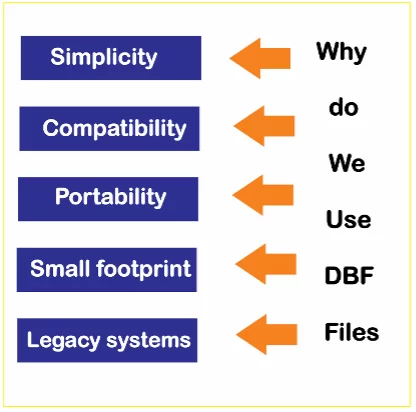
In the past, people commonly used DBF (dBase) files for several reasons.
- Simplicity
DBF files are simple and small in size. They have a simple structure that consists of a header and records, which makes them simple to create and manipulate.
- Compatibility
Most database management systems and programming languages included built-in support for reading and writing DBF files.
They were therefore a practical option for data exchange and storage between various systems.
- Portability
DBF files were portable, and users could easily transfer them between multiple platforms and operating systems without encountering any compatibility difficulties.
This makes them suitable for data interchange across systems in various environments.
- Small footprint
DBF files could store data effectively and compactly, making them appropriate for applications with constrained storage.
- Legacy systems
Many legacy systems and programs frequently use DBF files as the principal data store format. Consequently, DBF files were often utilized for system maintenance and interaction.
Why do we convert from DBF to SQL?

People convert a DBF (dBase File) to a SQL file for a variety of reasons.
- Compatibility
Database management systems widely use and standardize SQL as a language.
By converting a DBF file to a SQL file, you can work with the data into a format that is more compatible with new database systems, making it easier to import, query, and edit the data with SQL-based tools and frameworks.
- Additional Features
SQL databases provide more features and functionality than DBF files.
By transforming the data to SQL, you can utilize features like data integrity requirements, transaction management, indexing, and sophisticated querying.
This enables more efficient and powerful data management and analysis.
- Data Integration
SQL is a common language for data integration and interchange between many systems. Converting a DBF file to SQL enables for simple interface with other SQL-supporting databases or systems, facilitating data sharing and interoperability.
- Scalability and performance
SQL databases efficiently manage massive amounts of data.
You can benefit from enhanced scalability, performance optimizations, and better handling of multiple data access by converting the DBF file to SQL and using a powerful database management system.
Troubleshooting Typical Problems
During the import process, you might run into some common issues. Here are some methods for troubleshooting them to help you.
- Missing Dependencies
Ensure that you have all the necessary dependencies installed for the import method you are using. Some tools may require particular libraries or drivers to interface with DBF files or SQL databases.
- Errors in Field Mapping
Verify again how the fields in the DBF file and the SQL table are mapped. Check that each field in the DBF file corresponds to a field in the SQL table with the correct data type.
- Data Conversion Problems
Problems with data conversion Pay close attention to data type conversions when importing. If the data in the DBF file does not match the expected data types in the SQL table, you may face errors or data loss difficulties.
Difference between a DBF file and a SQL database?
Both a DBF file and a SQL database store and manage data, but they differ in their structure and functionality.
- Structure
- DBF File
In older database systems, such as FoxPro, dBase, and Clipper, people commonly used the DBF (dBase File) as a file format.
It is a straightforward binary file that keeps data organized in a tabular fashion, with each column denoting a field and each row denoting a record. You can access and edit DBF files using a variety of software programs.
- SQL Database
A SQL (Structured Query Language) database is a more complete and sophisticated database management system based on the relational concept.
It consists of several connected tables with rows (records) and columns (fields) within each table. Relationships based on main and foreign keys are used to connect tables.
A systematic approach to data administration and strong querying capabilities are provided by SQL databases.
- Functionality
- DBF File
People frequently use DBF files for straightforward applications and modest to medium-sized datasets. They provide basic functionalities for data storage and recovery.
However, they do not have advanced features such as data integrity constraints, transaction management, and concurrent access control.
DBF files are typically accessed using file-based procedures rather than a query language.
- SQL Database
You can manage large sizes of data and complex tools using SQL databases like MySQL, PostgreSQL, Oracle, and SQL Server.
They offer a variety of features, including data integrity enforcement through constraints (e.g., unique, primary key), support for transactions (ACID properties), indexing for performance optimization, views, stored procedures, and robust security mechanisms.
SQL databases provide a standardized SQL language for querying and managing data.
Hope you understand How to import data from a DBF file to SQL and the difference between a DBF file and an SQL File.
Features Of DBF File
A dBase file (DBF) is a common file format for storing structured data in a tabular style. Here are some of the main features of a DBF file.

- Tabular Structure
DBF files store data in a tabular structure, similar to a spreadsheet or a database table. The information is organised into rows and columns.
- Fixed-Length Fields
Each column in a DBF file has a defined length, which implies that the data for each field takes up a specific number of bytes. This makes it efficient for reading and writing data.
- Indexing
DBF files can include index files that enhance the speed of data retrieval.
Indexes make database operations more efficient, enabling them to search and sort data quickly according to specific fields.
- Limited Data Integrity
Unlike traditional databases, DBF files do not uphold rigid data integrity standards. However, certain implementations might offer fundamental safety and validity checks.
- Field Names and Metadata
Each field in a DBF file has a name that serves as a label for the information it contains. Fields may also contain extra metadata, including data type, length, and precision.
- Simple File Structure
The structure of a DBF file is quite simple, consisting of a file header, field definitions, and data records. This simplicity contributes to its comfort of use and efficiency.
General Tips for Importing DBF Files to SQL
1. Examine the DBF File Structure
Before attempting to import the data, understand the structure of the DBF file including the field names and data types. Tools like DBF Viewer can help inspect the contents without needing a full database application.
2. Choose the Right Tool or Method
Several methods and tools can facilitate the import process. These range from direct database import features, third-party data conversion tools, or programming scripts (e.g., using Python or R).
3. Prepare the SQL Database
Create the necessary tables in your SQL database. Ensure that the schema matches the structure of the DBF file, taking into account the correct data types and field sizes.
4. Data Conversion:
Pay attention to the data types during the import process. Data type mismatches (e.g., date formats, numeric formats) are common issues that need resolution when moving data from DBF files to SQL databases.
Specific Tips for Common SQL Databases
Importing DBF to MySQL
Using a Third-Party Tool:
If you convert the DBF file to a CSV, you can use MySQL’s LOAD DATA INFILE:
LOAD DATA INFILE 'path/to/your/file.csv'

INTO TABLE your_table

FIELDS TERMINATED BY ','

OPTIONALLY ENCLOSED BY '"'

LINES TERMINATED BY '\n'

IGNORE 1 ROWS;
Importing DBF to SQL Server
Using SQL Server Integration Services (SSIS):
- SSIS can be used to create a data flow task that reads from a DBF file and writes to a SQL Server table.
- Use the OLE DB source for the DBF file (you might need a specific OLE DB provider for DBF files).
SQL Code Example:
- Alternatively, convert the DBF file to a format like CSV and then use the BULK INSERT command:
BULK INSERT YourTable

FROM 'c:\path\to\file.csv'

WITH

(

    FIELDTERMINATOR = ',',

    ROWTERMINATOR = '\n'

)
Importing DBF to PostgreSQL
Using a Script:
- Python scripts using libraries like pandas and sqlalchemy can read DBF files and push data directly to PostgreSQL.
import pandas as pd

from sqlalchemy import create_engine

# Load data from DBF file

df = pd.read_pandas('path/to/file.dbf')

# SQL Alchemy connect string

engine = create_engine('postgresql://username:password@localhost:5432/mydatabase')

df.to_sql('table_name', con=engine, index=False, if_exists='replace')
Importing DBF files into an SQL database requires careful planning regarding data types and schema matching. Tools and methods vary based on the specifics of the source and target database systems. Always verify the integrity and completeness of the data post-import to ensure a successful transfer.
Frequently Asked Questions About Importing Data From a DBF File to SQL
What is the easiest way to import a DBF file into SQL?
The easiest path is usually to convert the DBF file to CSV first, then import that CSV into your SQL database. From there, use the database’s built-in import method, such as LOAD DATA INFILE in MySQL, COPY in PostgreSQL, or Bulk Insert tools in SQL Server.
Do I need to convert a DBF file before importing it into SQL?
In most cases, yes. Converting the DBF file to CSV makes the import process simpler because SQL databases and import tools handle CSV more reliably than raw DBF files.
What causes DBF-to-SQL imports to fail?
The most common issues are mismatched data types, incorrect column mapping, and missing drivers or dependencies. Checking the DBF schema before import and matching it to the SQL table usually prevents most errors.
Can I automate DBF-to-SQL imports?
Yes, you can automate the process with scripts or scheduled jobs. Python is a common choice because it can read DBF data, transform it if needed, and push it into MySQL, PostgreSQL, or SQL Server.
Why move data from DBF to SQL in the first place?
SQL databases are easier to query, scale better, and support features DBF files do not, such as indexing, transactions, and stronger data integrity controls. That makes SQL a better long-term option for reporting, analytics, and ongoing maintenance.
Final Thoughts
With the complete approach provided above, you should now be able to effectively import data from a DBF file to SQL.
These techniques will help you optimize your data management procedures and ensure that your SQL database is used effectively.
With these tips, you’ll be able to understand the technique for importing DBF files into SQL databases, allowing you to maximize the efficiency of your data management procedures.