
Snowflake Data Warehouse Architecture Explained
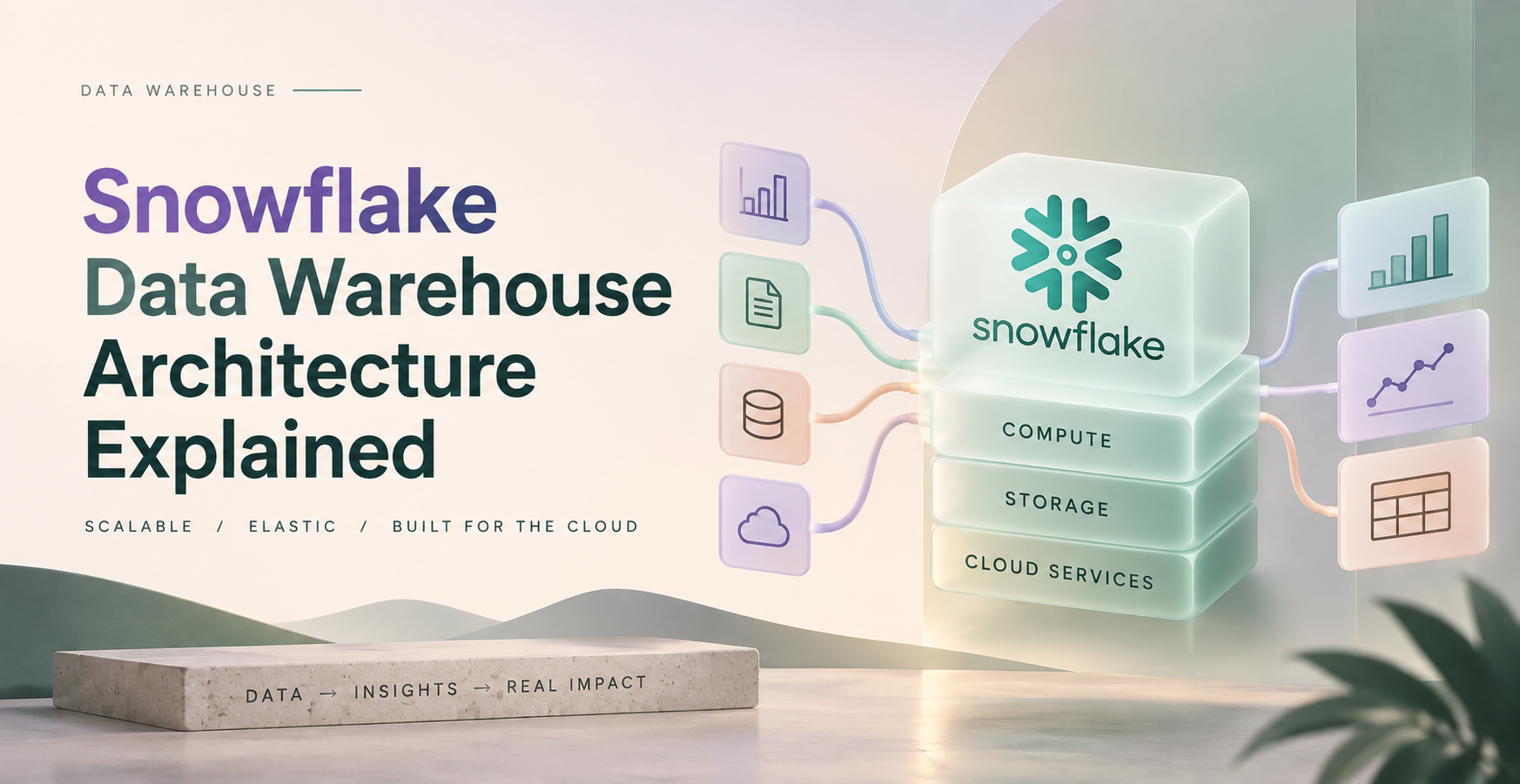
Snowflake uses a three-layer architecture: centralized cloud storage, independent virtual warehouses for compute, and a cloud services layer for coordination and security. This Snowflake data warehouse architecture lets teams scale data storage and query power independently. Beginners and working data professionals can use this model to understand how Snowflake stores, processes, protects, and shares data.
The design removes much of the infrastructure work found in traditional data warehouses. However, performance and cost still depend on data modeling, warehouse sizing, and workload habits.
Key Points
- Snowflake separates storage, compute, and cloud services.
- Virtual warehouses run workloads without copying shared data.
- Metadata helps Snowflake skip irrelevant micro-partitions.
- Security controls govern access at the account and object levels.
Quick summary: Snowflake centralizes data while giving each workload its own compute resources, which reduces resource contention.
Key takeaway: Storage and compute can scale separately, so one team does not have to disrupt another team’s queries.
Quick promise: You can use this architecture to design a clearer, safer, and more cost-aware analytics platform.
Snowflake Data Warehouse Architecture Explained: The Three Core Layers
Snowflake runs on AWS, Microsoft Azure, and Google Cloud. The platform manages the underlying infrastructure, while users work with databases, SQL, warehouses, and security controls.
Its architecture separates data storage from query compute. Traditional shared warehouses often tie both resources together, so a heavy reporting job can slow data loading. In Snowflake, multiple teams can query the same stored data through separate virtual warehouses.
Sources -> Storage -> Virtual Warehouse -> BI tools or applications
A database organizes related data. Schemas organize objects inside a database. Tables hold records, views save query logic, and stages provide locations for loading or unloading files.
What the storage layer does with your data
Snowflake stores relational tables and semi-structured formats such as JSON, CSV, and Parquet in cloud storage. It can also manage unstructured files through stages and directory tables.
Behind the scenes, Snowflake stores table data in compressed, columnar micro-partitions. It records metadata about those partitions automatically. Users do not manage file layouts, indexes, or partition boundaries in the same hands-on way required by many older platforms.
Pruning can reduce the data scanned for a query, but it does not make every query fast. Data layout, filters, joins, and warehouse size still matter.
Why virtual warehouses make compute independent
A virtual warehouse is a group of compute resources that runs SQL queries, data loads, and transformations. An ingestion warehouse can load source files while a BI warehouse serves dashboards and a development warehouse supports testing.
Teams can resize warehouses when workloads need more power. Auto-suspend pauses idle compute, while auto-resume starts it when work arrives. Multi-cluster warehouses can add clusters for high concurrency.
Larger warehouses can finish some work sooner, but they consume credits at a higher rate. Monitor actual query behavior before increasing size.
How Snowflake Processes Queries and Data Pipelines
A common pipeline starts with application events written to Amazon S3. Snowflake can load those files, transform them with SQL, and serve curated results to Tableau or Power BI.
Internal stages store files within Snowflake-managed locations. External stages point to cloud storage you manage. Connectors can also ingest data from SaaS tools and databases.
A practical five-step flow looks like this:
- Application events land in Amazon S3 as JSON or Parquet files.
- Snowpipe or COPY INTO loads those files into a raw table.
- SQL transformations create cleaned staging tables and trusted models.
- A virtual warehouse executes dashboard queries against curated tables.
- The cloud services layer checks permissions, parses SQL, and coordinates the work.
From raw files to trusted analytics tables
ELT is a common Snowflake pattern. Teams load data first, then run most transformations inside Snowflake.
Raw tables preserve source records for troubleshooting. Staging models standardize fields and remove duplicates. Curated or presentation tables provide stable metrics for analysts and BI tools.
COPY INTO suits scheduled batch loads. Snowpipe supports continuous file ingestion, while Snowpipe Streaming supports lower-latency row ingestion. Streams track changed data, Tasks schedule SQL work, Dynamic Tables maintain declared results, and dbt can manage tested transformation models.
Ingestion moves data in, transformation changes it, orchestration schedules work, and serving makes trusted data available to users.
How queries use metadata and micro-partition pruning
Snowflake stores metadata such as value ranges and null information for micro-partitions. If a query filters orders for a single month, Snowflake can skip partitions whose date ranges fall outside that month.
Pruning works best when filters align with how data is naturally organized. Functions applied to filter columns, broad SELECT * queries, unnecessary joins, and poorly organized large tables can increase scanned data.
For very large tables with recurring filter patterns, a clustering key may help. Treat it as a measured tuning option, not a default setting.
Snowflake Security, Governance, and Data Sharing in Practice
Snowflake controls access through roles, object privileges, and account-level settings. The cloud services layer evaluates those policies, while the storage layer holds the data.
Use role-based access control to grant permissions to job functions instead of individual users. Masking policies can hide sensitive fields, and row access policies can limit which records a role can see. Tags help classify data and attach governance rules.
Snowflake encrypts data in transit and at rest. Organizations can also configure SSO, MFA, network policies, and audit monitoring through query and access history.
Secure Data Sharing lets providers grant governed access to live data without sending copied files to consumers. Snowflake Marketplace builds on that model for shared data products.
A practical security checklist includes:
- Grant the least privilege required for each job.
- Separate administrator, engineering, analyst, and reader roles.
- Require MFA or SSO for human access.
- Mask sensitive fields and monitor access history.
- Assign clear ownership for databases, schemas, and policies.
How Snowflake Compares, and Where Costs Rise
Snowflake is not the only architecture for cloud analytics. The right choice depends on workloads, skills, interoperability needs, and governance requirements.
| Architecture | Storage and compute model | Best fit | Main tradeoff |
| Snowflake cloud data warehouse | Separate managed storage and virtual warehouse compute | SQL analytics, governed sharing, mixed business workloads | Credit management needs attention |
| Traditional appliance warehouse | Storage and compute commonly scale together | Stable on-premises workloads | Less flexible scaling and higher infrastructure ownership |
| Data lakehouse with Iceberg or Delta Lake | Object storage with separate engines and open table formats | Multi-engine data access and open-format ecosystems | More platform choices and operational decisions |
Snowflake also supports lake and lakehouse patterns through external tables, external volumes, and Apache Iceberg support. Exact capabilities can vary by cloud, account edition, and configuration.
Main costs include compute credits, warehouse runtime, storage, data transfer, cloud services usage, and optional features. Pricing varies by region, provider, edition, contract, and usage, so check current Snowflake pricing before estimating budgets.
Auto-suspend, resource monitors, query history reviews, and workload-specific warehouses limit waste. A faster query is not always the cheapest query.
Snowflake Architecture Best Practices for a Scalable Data Platform
Separate ingestion, transformation, BI, and ad hoc workloads when they compete. Pair that isolation with clear database and schema names, separate development and production environments, and role-based access.
Use lifecycle policies for stale data and review query history regularly. Automate infrastructure and permissions with Terraform, Git, and CI/CD pipelines. Test larger warehouses before adopting materialized views, clustering keys, or search optimization.
One-minute summary
- Create separate warehouses for workloads with different concurrency or reliability needs.
- Load source data into a raw layer before applying business rules.
- Build curated tables for dashboards instead of querying raw events directly.
- Set auto-suspend and resource monitors before users create warehouses.
- Review expensive queries before increasing warehouse size.
- Keep production changes version-controlled and tested.
A simple reference design for a growing analytics team
Operational databases and SaaS tools feed cloud storage or connectors. Raw data lands in Snowflake, transformations build trusted models, and BI tools query curated tables through a dedicated reporting warehouse.
Data engineers own ingestion and platform reliability. Analytics engineers own transformation models and metric definitions. Security teams govern access, while business users consume approved data products.
Airflow, Dagster, and Snowflake Tasks can orchestrate work. Pick the option your team can support consistently.
Snowflake glossary
- Virtual warehouse: Compute resources that execute SQL and data operations.
- Micro-partition: A small, automatically managed unit of table storage.
- Stage: A location for files waiting to load or unload.
- Snowpipe: A service that loads newly available files into Snowflake.
- Stream: An object that tracks table changes for downstream processing.
- Task: A scheduled or dependency-based unit of SQL work.
- Role: A permission set assigned to users or other roles.
- Masking policy: A rule that hides column values for unauthorized roles.
- Clustering key: An optional setting that can improve pruning on large tables.
- Data sharing: Governed access to live Snowflake data without file copies.
Frequently Asked Questions
What are the three layers of Snowflake architecture?
Snowflake has a storage layer, a compute layer, and a cloud services layer. Storage holds data centrally, virtual warehouses run queries and transformations, and cloud services manage metadata, authentication, permissions, and query coordination. This separation lets teams scale query capacity without duplicating stored data.
Is Snowflake storage separate from compute?
Yes. Snowflake stores data independently from the virtual warehouses that process it. A team can pause an idle warehouse without deleting stored tables. It can also use different warehouses for ingestion and reporting against the same data.
What is a virtual warehouse in Snowflake?
A virtual warehouse is Snowflake’s compute cluster for running SQL, loading data, and executing transformations. Warehouses can be resized, configured to auto-suspend, and assigned to distinct workloads. Larger sizes may reduce runtime, but they also use credits at a higher rate.
How does Snowflake load data from Amazon S3?
Snowflake can load S3 files through an external stage and COPY INTO for batch jobs. Snowpipe can ingest files as they arrive, while Snowpipe Streaming supports lower-latency ingestion. Teams usually load raw files first, then transform them inside Snowflake with SQL.
Does Snowflake copy data for secure sharing?
No. Secure Data Sharing gives consumers controlled access to live shared data without exporting and duplicating files. Providers retain governance over the shared objects. Consumers can query the shared data through their own Snowflake account and assigned permissions.
What makes Snowflake queries faster?
Metadata and micro-partition pruning can reduce the amount of data scanned. Query speed also depends on warehouse size, filter patterns, joins, table organization, and concurrency. Start with query profiles and workload measurements before adding clustering or larger compute.
Is Snowflake a data lakehouse?
Snowflake is primarily a cloud data warehouse, but it supports lake and lakehouse use cases. External tables, external volumes, and Apache Iceberg support can connect Snowflake to object storage and open table formats. The best design depends on engine requirements and governance needs.
How can teams reduce Snowflake costs?
Set auto-suspend for idle warehouses, isolate workloads, and use resource monitors. Review query history to find wasteful scans and oversized compute. Test warehouse sizes against real workloads, because reducing runtime does not always reduce the total credit cost.
Final Thoughts
Snowflake separates storage, compute, and cloud services so teams can scale workloads independently while governing shared data from one platform. Yet strong results depend on workload isolation, sensible models, access controls, monitoring, and cost discipline.
Start with a small account, load sample data, inspect query profiles, and test separate warehouses for ingestion and reporting. Data Engineer Academy’s hands-on projects and coaching can help you practice those decisions on end-to-end data pipelines.